Wind, vibration, and sudden turns constantly shake any aircraft moving through open air. Without help, that motion turns beautiful scenery into jittery, unwatchable footage. A drone with gimbal stabilization solves this problem with clever mechanical engineering. Motors counteract unwanted movement, keeping the camera steady while the aircraft moves. The result looks like footage from a crane or cable rig on a film set. Understanding how gimbals work helps you get far better results from every flight. Settings, flight style, and maintenance all influence how smooth your clips appear. This article explains those factors in plain, practical language for new pilots. It also explores a professional model with a Hasselblad camera and long flight time. Read through each section before your next outing in the field. Smooth footage is easier than you think.
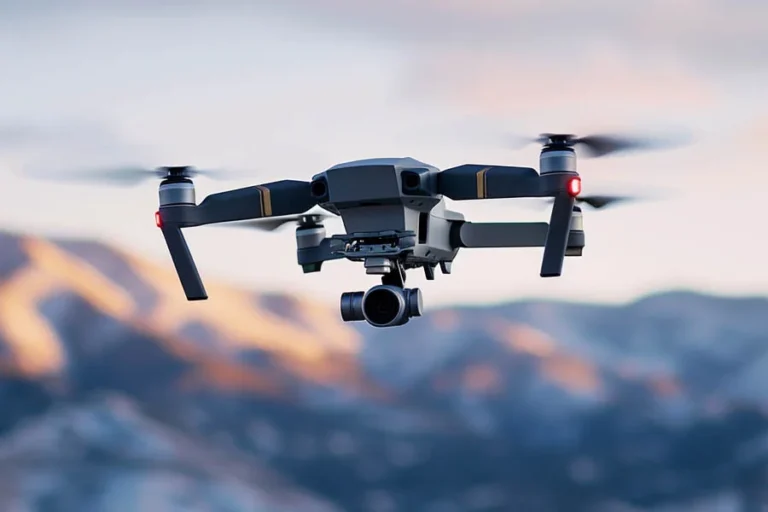
A gimbal suspends the camera on motorized axes that respond to movement instantly. Sensors detect tilting, rolling, and turning many times every single second. Motors then push the camera in the opposite direction to cancel that motion. Most serious aerial cameras use a 3-axis gimbal camera for complete stabilization. Three axes cover pitch, roll, and yaw, which handles nearly every movement. The Hivaro listing pairs this kind of stabilization with a Hasselblad camera. Its 1-inch CMOS sensor records 4K HDR video with rich detail. GPS stabilization keeps the aircraft itself steady during hovering shots. Together, these systems produce footage that looks calm even on breezy days. Viewers rarely notice stabilization, which is exactly the point. Great engineering stays invisible.
Even the best gimbal performs better with thoughtful camera settings selected beforehand. Use a shutter speed roughly double your frame rate for natural motion blur. That blur smooths small movements and makes footage feel more cinematic overall. The adjustable aperture helps achieve correct exposure without extreme shutter speeds. Neutral density filters can reduce light further on bright sunny afternoons. Shoot in the 10-bit Dlog-M profile when planning detailed color grading. Keep the gimbal pitch speed low in settings for gentle tilting movements. Smooth controller inputs prevent the gimbal from fighting sudden stick changes. Store footage on fast, reliable micro sd cards rated for high-bitrate video recording. Slow cards can cause dropped frames that no gimbal can fix. Details like these make a visible difference.
Stabilization works best when your flying style supports it rather than fighting it. Combine gentle forward movement with slow camera tilts for elegant reveals. Orbit a subject at a steady speed while keeping it centered in frame. ActiveTrack 2.0 helps maintain smooth tracking of moving people or vehicles. Hyperlapse and panorama modes take advantage of a steady camera platform. Avoid sharp yaw turns, which can create visible jolts even with stabilization. Fly in calm conditions while you build confidence and muscle memory. Many pilots first learn on mini drones for beginners before upgrading to professional aircraft. Those skills transfer well, especially smooth stick control and spatial awareness. Review your clips and identify any moments where motion felt abrupt. Practice turns good equipment into great footage.
Wind remains the biggest challenge for stabilization, especially at higher altitudes. Gusts push the aircraft sideways while the gimbal works hard to compensate. Strong winds can also drain batteries faster than calm conditions allow. This model offers up to thirty-one minutes of flight in favorable weather. Plan shorter flights on windy days to keep a safe battery reserve. OcuSync 2.0 transmission reaches up to eight kilometers in ideal conditions. Keep the aircraft within visual line of sight, as FAA rules require. Omnidirectional obstacle sensing adds an extra layer of protection near trees. Check the forecast and avoid flying in rain or heavy fog. Realistic expectations keep both footage and aircraft safe. Weather awareness is a core piloting skill.
Gimbals contain delicate motors that deserve careful handling between every flight. Always attach the gimbal cover before packing the aircraft into its case. Never force the camera by hand while the drone is powered on. Remove sand, dust, and moisture gently with a soft brush and cloth. Run a gimbal calibration if footage begins to tilt or drift unexpectedly. Store lipo batteries at partial charge in a cool, dry place. Fully charged batteries left for weeks can degrade faster over time. Inspect propellers for chips or cracks before each takeoff. Keep firmware updated so stabilization and safety features perform properly. These habits protect your investment through many seasons of flying. Gentle care pays off in smoother footage.
Look for three-axis stabilization, a capable sensor, and dependable flight time. The listing specifies the Mavic 2 Pro model with a Hasselblad camera. Its large sensor and 10-bit color profile suit serious creators and hobbyists. Register any drone above 250 grams with the FAA before flying. Recreational pilots also need to pass the free TRUST test online. Hivaro offers fast US shipping and a money back guarantee on this drone. That support makes upgrading to professional stabilization feel less risky. Practice smooth movements in open fields before tackling complex locations. Pack spare batteries so a single flight never feels rushed. Then capture footage that looks steady, polished, and genuinely cinematic.



Leave a comment